
August 25th, 2026 | Jacob Holdsworth
 Using IRs with your Amp Recreation Pedals
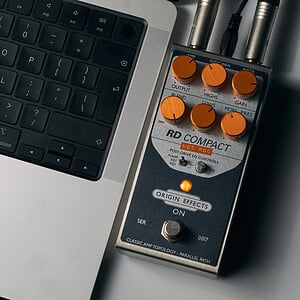
Our pedals are designed to be used in a number of ways; in this article, we’re focusing on their use within a direct rig using an impulse response-based cabinet simulator.
What is an IR (in the context of a cab sim)?
An impulse response (or IR) is, for our purposes, a frequency measurement of a mic’d-up guitar cab, contained within a .wav file. This file can be read by an IR loader or convolution reverb to recreate the frequency response of the captured cabinet.
When paired with a guitar amp and reactive load, or one of our Amp Recreation pedals set to P/AMP or FLAT mode, this IR cab sim can replace a real mic’d-up cabinet with incredibly realistic results. This allows you to swap guitar cabs or mic choices as you please, blend different cabs and sounds, and opens up further routing opportunities, as you can place the cab sim after modulation or pitch effects.
IRs can be found from a variety of sources, both paid and free. Heck, you can even make your own! But to get started, we recommend downloading our own free IR Cab Library, which can be found here: www.origineffects.com/product/ir-cab-library/
How to setup your Amp Recreation pedal for IR use
Luckily, this part is quite simple!
Guitar Amp Recreation
In our guitar Amp Recreation pedals, you need to disable the output filtering of EQ1/2. By doing so, the output of the Amp Recreation pedal is akin to that of the modelled amp on a reactive load. Without any cab sim, this setting will sound bright and harsh. Don’t worry though, this is 100% to be expected. The cabinet simulation will shape the sound, providing a result that sounds just like the real thing.
POST-DRIVE EQ – Select the P/AMP position.
POST-EQ – Select the FLAT position.
RE-AMP EQ – Select the PWR AMP position.
Bass Amp Recreation –
Our bass Amp Recreation pedals operate a little differently with their filtering, so there are a few more steps. You may find that some of these controls are useful even when a cab sim is applied. But to start with, we should return everything to its neutral position.
POST AMP EQ – Select ‘O’ on your HORN CUT, or LO CUT and HI CUT. Return LF and HF knobs to the 12 o’clock position.
How to use your IRs
There are a few ways you can load and use IRs as your cabinet simulator, so we’re going to go over some of your options.
On the Pedalboard
Pedal IR Loaders – Pedal IR loaders have been around for a while now, and there are some great options on the market. Whether you’re just looking for a quick fix to dip your toes in or want something that’s ready for any gig, you can find one new or used at a great price.
At the office and on our demo boards, we tend to use the Two Notes Cab M (now Opus), as it delivers low-latency operation and a suite of I/O not commonly found on cheaper options. The Two Notes comfortably fits into the ‘ready for any gig‘ category and offers some extra features, like reverb, should you need it in a pinch.
The method for loading IRs onto the device will vary from product to product, so check your manufacturer’s manual for details.
Multi-Effects & Modellers – You may already own an IR loader; you just haven’t discovered it yet!
Many multi-effects pedals, especially those containing amp sims, have IR-based cab simulators built in. The same can be said of modellers that have cab blocks. If you’re using a Line 6 HX Stomp, Quad Cortex, or even a Hotone multi-effects unit, you have the ability to load custom IRs onto your pedalboard.
The process for loading custom IRs will vary from unit to unit, so it’s best to consult your device’s manufacturer for details and limitations.
In your Digital Audio Workstation (DAW)
If you’re recording at home or in the studio, IRs can be loaded directly into your DAW via plugins.
Your DAWs Convolution Reverb – Most DAWs have an IR-based reverb packaged with them as a stock plugin. In Logic Pro, this is ‘Space Designer’; in Pro Tools, ‘Space’; in Reaper, ‘ReaVerb’; and in Cubase, ‘REVerence’. These are all primarily reverb IR plugins, but their ability to load reverb IRs means they can load cab IRs too!
Just import your IR into your plugin, set any mix/blend control to 100% wet, and make sure the pre-delay is turned off.
IR Cab Plugins – For total flexibility, you could upgrade to a more fully featured IR cab plugin. These are often paid, but allow you to more easily switch between and blend different cab IRs. Some even allow you to export your blended IR as a single file for use elsewhere.
Amp Simulators – A lot of plugin amp modellers use IR-based cab sim sections that allow you to load your own IRs into them. If you wish to use these as an IR loader with external amp sources, you’ll need to turn off the amp simulation section of the plugin.