
FREQUENTLY ASKED QUESTIONS
GENERAL QUESTIONS:
What power supply should I use with my pedal?
At the bottom of the FEATURES tab on each product page you'll find a Specification section. This shows the power supply requirements for that specific model.
What bypass scheme do you use in the compact pedals?
Our original series of large format compressors feature switchable true-bypass and buffered-bypass modes utilising a three pole mechanical switch in the signal path.
In the case of the compact series of pedals, we’ve opted to go with a fixed buffered bypass scheme. This guarantees transparent signal transfer, correct pickup loading, reliability and noiseless switching.
True bypass relies on the use of more complex mechanical switches and/or relays which all generate small amounts of switching noise. Our pedals (particularly the SlideRIG) apply extreme amounts of gain and this tends to accentuate even the slightest of noise sources. In an effort to get ever closer to perfection we’ve chosen to opt for a switching system that places the switch outside of the signal path.
True-bypass is great when you want to be sure that a pedal is not colouring your tone when switched off. However, plugging your guitar into long cables and/or chains of true-bypass style pedals will result in some high frequency loss due to the inductance and capacitance of cable and wiring. Cheap patch leads are particularly bad in this respect. Buffered-bypass schemes will effectively drive the signal down your cables to maintain a full and natural frequency response.
If you require true bypass from a compact pedal, an external looper can be used.
Can you modify my Origin Effects pedal?
We are unable to offer custom modification for our products.
COMPRESSORS:
What is a compressor?
In simple terms, a compressor is an effect which makes the loud parts of your signal quieter and the quiet parts louder. There’s a lot more to it than that, and compression can influence the dynamics of your instrument in a lot of different ways. It can make your guitar or bass snappier and punchier, add sustain, help it sit in the band mix, or make it sound louder without boosting the overall level.
For a detailed look at how compression works, check out our Understanding Compressors video. https://www.youtube.com/watch?v=Walc3KFa8jk
What is a FET compressor?
FET is a shortening of “field-effect transistor”, which is the type of component used in the Cali76 pedals to achieve compression. There are various types of compression circuits, such as optical, VCA and FET and they all have their own character. FET compression is known for its very fast dynamic response and also for its transparency. The most famous FET compressor is the Urei® 1176® studio compressor, which the Cali76 pedals are based on. Expect punchy attack, minimal colouration and plenty of tweakability.
What is a “Stacked Compressor”?
When we say “Stacked Compressor”, we mean two compression circuits connected in series (the output of one running into the input of the other), inside a single pedal. The purpose of the Cali76 Stacked Compressor is to achieve very high levels of compression and sustain. Having two separate stages of compression means that you can adjust each one individually, giving you a wide range of highly compressed sounds, and a different character when compared to a single compression stage cranked to an extreme setting.
How does the Cali76 Stacked Compressor differ from the older Cali76 Stacked Edition?
The Cali76 Stacked Compressor retains the sound and features of the Stacked Edition, while incorporating some of the latest refinements to our Cali76 circuit. These include:
- A new, 17% smaller enclosure. Compatible with even the most compact pedalboards!
- The new power supply boosts a 9V power source internally to 24V. No need for an 18V supply!
- This new 24V supply means more clean headroom. Your tone stays clean even with extreme compression, and plays nicely with line-level gear.
What are the differences between the Cali76 FET Compressor and Cali76 Bass Compressor?
The Cali76 FET Compressor and the Cali76 Bass Compressor are almost identical in their circuitry, featuring the same high-headroom FET circuitry, LED metering and DRY control. The Cali76 Bass Compressor differs from the Cali76 FET Compressor in two important ways:
Firstly, the Cali76 Bass Compressor features the HPF knob – or high-pass filter. This control applies a high-pass filter to the sidechain, which is the part of the compressor that controls how it responds to your input signal. The volume of low frequencies in a bass guitar signal is so great that it can obscure the details of how you are playing, as this information is contained in the higher frequencies.
The HPF control allows the Cali76 Bass Compressor to ignore these ever-present low frequencies and focus on the dynamics of your playing. Increasing the HPF knob gives the impression of more dynamics on the lower strings and a more natural response in general.
Secondly, the addition of the HPF knob requires the ATTACK and RELEASE controls to be combined on a single ATT/REL knob. This control offers all the most useful combinations of attack and release settings, making it easy to dial in the perfect Bass compression tone.
What is the difference between the Cali76 Stacked Compressor and the Cali76 FET Compressor?
The Cali76 FET Compressor is a high quality, vintage-style studio compressor in pedal form, which focuses on tweakability and accurate dynamic control. The Cali76 Stacked Compressor is aimed at very over-the-top compressed sounds and endless sustain. It is designed for players who use compression as a creative special effect, and who want to dramatically alter the dynamics of their instrument. While the Cali76 Stacked Compressor is also capable of more subtle sounds, it really excels at the super-squashed, attention-grabbing tones.
Where do I put the compressor in my signal chain?
Most compressor users prefer their compressor as near to the start of their signal chain as possible. This is so the compressor can process the raw guitar signal, changing the dynamics of the instrument before passing that signal on to other pedals. Because a compressor’s job is to alter the dynamics of the instrument, it can be harder to achieve the desired effect when the compressor is used after other pedals – such as overdrive – which reduce the dynamic range in their own way, giving the compressor less to work with.
Some players like to use compression after drive, but this requires much more subtle compression and is usually used to fatten up the tone overall, rather than to achieve obvious “snappy” compression tones.
Another reason to use a compressor at the start of the chain is to minimise noise. Because compressor amplifies the low-level parts of a signal, it will also amplify any background noise. When used at the start of the chain, there is much less background noise to amplify, whereas compressors placed later in the chain will amplify noise from all the pedals placed before, such as overdrives or distortions.
Players using vintage fuzz or wah pedals that do not work with buffers should place these before the Cali76, as the Cali76 used buffered bypass.
Where should I place the Cali76 Stacked Compressor in my signal chain?
Because the Cali76 Stacked Compressor is capable of such high levels of compression, it works best as close as possible to the start of your signal chain. Any pedals that don’t work well after buffers (such as vintage fuzz and wah) should be placed before the Cali76 Stacked Compressor.
All compressors will amplify background noise, so any noisier pedals (such as overdrive and distortion) should be placed after the Cali76 Stacked Compressor.
Does a compressor increase noise?
Compressors increase the volume of the quieter parts of a signal. So, if there is background noise in your signal, the compressor will exaggerate it. The more compression you use, the more it will exaggerate the background noise from any pedals placed before the compressor.
This is one of the reasons that compressors tend to be used near the start of the signal chain, so that there is minimal background noise for them for them to amplify. When using a compressor later in the chain, particularly after noisier pedals like overdrive and distortion, it is important to take care with your compression and overdrive settings to keep noise to a minimum. Checking each pedal one-by-one can help to get an idea of where the noise is coming from and where it is being exaggerated by other pedals.
I have the outgoing Cali76 Compact Deluxe or Cali76 Compact Bass. Do I need to upgrade to the Cali76 FET Compressor/Bass Compressor?
The outgoing versions of the Cali76 pedals are very capable compressors. We have retained the control set and overall character of the compression, but we have also made some improvements:
- The new Cali76 FET Compressor and Bass Compressor are 17% smaller than their predecessors, with a footprint of 64mm x 124mm (2.5” x 4.8”).
- The Cali76 FET Compressor and Bass Compressor feature a 10-LED gain reduction meter, which gives an accurate visual indication of how much your signal is being compressed, and also how fast the compression circuit is reacting to your signal.
- The Cali76 FET Compressor and Bass compressor increase power supply voltage internally. They take a 9V supply and boost it up to 24V, giving them very high headroom – even higher than running their predecessors at 18V! The result is an even cleaner, more transparent compression tone that can handle hot pickups, line level signals and studio outboard gear.
- When we designed the Cali76 FET Compressor and Bass compressor, we made some small changes to the sidechain design. These changes bring the dynamic response of the new pedals closer to our original “large-format” pedals, which are now highly collectible. The response is now a little punchier, with a flatter frequency response and more clarity in the low end.
If you think these new improvements would benefit you, then you may want to consider an upgrade. If not, rest assured that your Cali76 Compact Deluxe/Compact Bass is still a great compressor!
What's the difference between the SlideRIG and the Cali76 Stacked Edition?
In essence, the Cali76 Stacked Edition is the missing link between the Cali76 and SlideRIG ranges. A brand-new control – the gold ‘Thru’ knob – determines how much signal is fed from the first compressor to the second. Incredibly simple to use, this control allows the Stacked Edition to deliver not only single-stage Cali76 and dual-stage SlideRIG sounds but also everything in between.
Independent LED VU meters let you see exactly how hard each stage is working, while each of the compression stages features its own combined Attack/Release control. With the Cali76 Stacked Edition, you can combine two distinct flavours of compression – one to add sustain and fullness and the other to subtly limit any stray peaks, for example – or max out both stages for a super-sensitive, ultra-sustaining “clean overdrive” effect.
When adjusting the controls on the SlideRIG, parameters of both stages are adjusted simultaneously, for example, adjusting the ATT/REL will change both stages to the same times. The Cali76 Stacked Edition allows these parameters to be set independently from one another, for example, the ATT/REL for the first stage can be set fast/slow and the second stage can be set slow/fast.
Which frequencies are effected by the HPF on the Cali76 Compact Bass?
The frequencies filtered out of the sidechain are 20Hz (most filtered) to 350Hz (least filtered). Turning the HPF control clockwise reduces the amount of these frequencies that trigger the compressor, making them relatively louder than frequencies above 350Hz.
The HPF is most dramatic on bass instruments such as electric and acoustic bass, piano and upright (double) bass, but can really help add punch and clarity to drop-tuned electric guitar.
What's your favourite Cali76 setting?
Percussive Compression for Soloing into a Clean Amp (like a Fender Twin Reverb).
The initial transient of each note should leap out of the amp, especially when playing staccato runs of notes! I love the Allman Brothers and this setting really enhances the chimey tone of my SG when I play those Dickey Betts lines!
Input: 3 o’clock with humbuckers, fully cranked with single coils;
Output: to taste, without over-driving the input of the amp;
Attack: Fully Counter-Clockwise
Release: Fully clockwise
Release 4:1 – Fully Counter-Clockwise
“TX” Rear Panel Switches: in downwards positions.
What to avoid with compressors.
A FET compressor is a powerful form of compression, due to the fact that it can respond so quickly. However, this isn’t always a good thing and when used with guitar it’s very easy to select settings that result in audible distortion artifacts.
When compressing you’re essentially attacking the waveform, and so you must be careful not to gouge out large chunks! Dialing in high levels of Ratio, along with very fast Attack and Release settings WILL result in distortion. These distortion artifacts will get more audible on lower strings, and when playing complex “jazzy” chords. For this reasons it’s often best to offset particularly strong settings on one of the Attack, Release, or Ratio controls, by dialing in less extreme settings on the other two knobs.
What the hell are Attack and Release?
Simon Keats (designer): “There’s a lot of confusion when it comes to using attack and release controls with guitar. Having happily typed a short novel to a customer (I’m ALWAYS happy to help) I thought I would share the knowledge…
“The release control cannot be used to increase sustain, but it can do good stuff…
“Fundamentally, a compressor will reduce the level of a loud signal, whilst in the case of the Cali76 & SlideRIG, also applying a degree of boost to quieter signals. When the compressor applies “gain-reduction” the loud signal is made to be quieter. Once the loud signal has been safely seen off the compressor will relax and return back to its normal state. The release control governs how quickly the compressor returns back to its normal state i.e. back to applying a degree of boost.
“A very fast release means that the compressor will react quickly and fully recover between all notes. Imagine a scale of loud staccato notes. With a fast release, the compressor will reduce the level of each note in an identical way, whilst fully recovering in time to address the next note in the sequence. The compressor will, therefore, balance out the level of each note against its neighbour! More than likely, you will hear the compressor quickly pump as the gain is modulated. Also, with a slow attack, the compressor will impart a satisfying percussive thud on each note!
“A slow release will mean that the compressor can’t return to its normal state before the next note is played. This means that in a scale of notes the dynamic relationship between adjacent notes is pretty much preserved. There is no “pumping” effect. In fact, everything sounds pretty natural! Note to shops: this is a crap setting to dial in when trying to demo an “exciting & impressive” compressor pedal! Though not as exciting, this type of setting is highly useful for ironing-out level differences between passages of playing, for example for balancing single notes lines against more energetic rhythm playing!”
Why is there a lot of hum when my compressor is on?
Origin Effects compressor pedals are designed to be quiet and hum-free, however, the nature of a compressor is that it will amplify any quiet signal entering it. If noise or hum is entering your signal chain before the compressor it will become louder when leaving the compressor circuit.
Best practice is to place a compressor pedal before any devices which could be adding hiss, hum, or noise. Likely culprits are distortion-based effects such as overdrive, fuzz and distortion pedals.
Hum picked up by singlecoil pickups will also be amplified by a compressor pedal. Try your pedal straight into an amplifier with a humbucker-loaded guitar to see if the noise disappears.
Why is my signal distorted when compressing?
All of our Cali76 pedals will distort when certain settings are combined – this is because each control has a broad range which makes the Cali76 useable with a variety of instruments (guitars, drums, vocals etc). The distortion can be described as a crackly, crunchy effect which can increase as the note fades out.
Setting the RATIO, ATTACK, and RELEASE controls near maximum will certainly produce distortion with electric guitar, especially on lower strings.
Try these settings to see if the distortion disappears:
RATIO Minimum
ATTACK Minimum
RELEASE Minimum
OUTPUT 2 o’clock
INPUT 12 o’clock
Why does my Cali76-TX produces a "fluttering" sound?
This will occur when the unit is powered from a supply providing voltage between 9V and 18V. The relays inside the TX and TX-L models will switch at around 11V kicking in the transformer circuit; the relays can rapidly switch on and off if supplied with a voltage close to this.
Supplying the unit with less than 10V and more than 13V will ensure no relay flutterin
How can you fit the original Cali76/SlideRig into a compact stompbox?
In designing the Compact Series pedals, Origin Effects has gone to painstaking lengths to preserve the build quality and sonic integrity of the original Cali76 and SlideRIG circuits, even improving on them where possible.
The reduction in size has been achieved by using a mixture of traditional through-hole and SMD components, spread across a pair of densely populated, stacked boards. The signal path utilises film and tantalum capacitors, carefully chosen low-noise transistors and rugged MELF resistors (essentially traditional through-hole resistors without the leads), which offer low-noise performance and rock-solid reliability.
One of the reasons why the original Origin pedals sound so good is that they deliver true FET compression, with a fast yet highly musical response that is a world away from the brutal and unforgiving sound of traditional VCA compressor pedal designs. The new Compact Series pedals stay true to Origin’s design philosophy with absolutely no opamps or VCAs used in the signal path.
The new pedals are powered by mains adapter only. Dispensing with the usual internal 9V battery option allows more space inside the enclosure for high-quality circuitry, while also supporting the high-current circuit design that is the key to these pedals’ astonishingly low noise levels.
Can the Noble Amplifier Company Preamp power the Cali76-TX?
The Noble Amplifier Company Preamp will only power the Cali76-TX in standard mode. Use one of the 9V outlets to power your Cali76-TX if using this preamp.
The transformer circuitry is switched in by relays when provided with 14.6V. If the -TX has powered up with the transformer engaged then dropping the voltage below 12.6V will switch out the transformer circuitry; the Cali76-TX will then perform like a Cali76 Standard.
We do not recommend using a supply of 12V – 15V as possible variation in regulation of mains voltage could cause the transformer stage to switch in and out of operation. 18V is recommended for best results when using the transformer output stage.
UPDATE: Noble Amplifier Company now offers an optional 18V boost cable to power the Cali76-TX at 18V directly from the Noble preamp. When using this cable the transformer will be engaged.
How do I know whether I have Cali76-TX or -TX-L?
The easiest way to tell is by the serial number: pedals fitted with a Lundahl transformer have a letter “L” at the end of the serial number.
The hard way is to remove the pedal’s base and look for the transformer. If it’s black then it’s our own “Iron-core” TX and if it has a silver transformer cover that has Lundahl’s logo on it then, you guessed it, you have a TX-L.
Where can I buy a Cali76-TX-P / -TX-L-P / -G / -G-P...?
We currently have no plans to reintroduce the TX-P or G-P Cali76 models in the foreseeable future. These models required expensive and difficult to source components, as well as a huge amount of man-hours to assemble, so sadly, didn’t prove to be cost-effective for us to keep producing.
Our highly sought after discontinued models do show up on eBay, Reverb.com, Craigslists etc, from time to time, so keep an eye out for a piece of Origin Effects history!
Can the Cali76 Stacked Compressor do subtle compression?
Although geared towards extreme compression, the Cali76 Stacked Compressor can still produce more subtle compressed tones. By turning the THRU knob all the way down, the Cali76 Stacked Compressor will function much like a normal single-stage compressor.
However, if subtle studio-style compression is your top priority, you may find the Cali76 FET Compressor or Cali76 Bass Compressor more suited to your needs.
EQDELUXE:
What's so interesting about the EQ DELUXE?
The EQDELUXE is different to a typical guitar or bass EQ. It’s based on the Pultec EQP-1a, a highly sought after studio EQ from the 1950s which has a signature sound and excellent low-end response that make it a very popular choice for mixing bass guitar. It’s a very capable EQ, but also serves as a tone-enhancer, overdrive and a vintage-flavoured bass preamp.
What is a Pultec?
The Pultec EQP-1a is a passive, inductor-based EQ first introduced in the 1950s. It has a signature sound which is defined by deep, weighty lows, natural sounding EQ curves, and subtle saturation that is known for adding character and “mojo” to any signal.
The EQP-1a is best known for the “Pultec Trick”, which is a unique EQ curve created by using the low frequency boost and cut controls simultaneously. This results in a particular bass boost and low-midrange cut that sits perfectly in a mix, with a hefty low end and a feeling of clarity in the midrange.
The Pultec’s other important trait comes from its push-pull valve make-up amplifier. Designed to counteract the signal loss from its passive EQ circuitry, this valve output stage contributes desirable saturation and harmonics that are said to improve a signal even when no EQ is being applied.
Both the “Pultec Trick” and this output stage saturation are recreated in the EQDELUXE using all-analogue circuitry.
Why does it have separate low boost and cut?
You can’t do the “Pultec Trick” without separate LOW BOOST and LOW CUT controls. Each of these controls is very useful on its own, for boosting and cutting low frequencies with a gentle shelf control. When used together, they create a unique and desirable EQ curve that adds weight and clarity to a signal. This works especially well on bass and is the famous “Putlec Trick”, known in studios the world over.
Is this for bass or guitar?
Both! The EQDELUXE is a studio EQ in a pedal, so it will get you great results on bass, guitar and other sources. That said, it’s based on the Pultec EQP-1a, which is a particular favourite for bass. We’ve designed the circuitry and selected the EQ frequencies to work on bass and guitar, but the famous low-end weight of the “Pultec Trick” is most obvious on the low notes!
Why is it called an EQ and Drive?
We based the EQDELUXE on the Pultec EQP-1a, and part of the Pultec sound comes from its push-pull valve make-up amplifier. This output stage is revered for the saturation and harmonics it adds, contributing lots of character to a signal – and noticeably overdriving if you push it hard enough!
When we designed the EQDELUXE, we made sure this saturation and overdrive was easily available in a bass/guitar pedal, letting you dial in the perfect balance between mojo, saturation and vintage grit. And we wanted you to know this pedal isn’t your average sterile EQ! It can be used as a simple EQ, but also as a boost, an overdrive, and a very effective bass preamp.
Will it stay clean?
Of course! While the EQDELUXE can get overdriven, it doesn’t have to. For maximum clean headroom, set the GAIN control fully anticlockwise and adjust your overall level using the LEVEL knob. With the GAIN at minimum, you’ll find unity gain at 2 o’clock on the LEVEL control, with 8dB of clean boost available if you crank the LEVEL.
Where does it go in my signal chain?
As always, it depends. EQ can work great at any point in the signal chain, depending on what you need from it, but there are some tips that can help.
If you’re using it near the start of the chain, shaping the sound from your bass or guitar before hitting other pedals like preamps or overdrives, it’s best not to boost too much bass as this can overwhelm subsequent drive stages.
If you’re using the EQDELUXE later in the chain to tailor your overall sound, you can be more generous with the low end. And you will most likely get the best results with the EQDELUXE set cleaner.
The best advice is to experiment and see what works best in your rig.
The Pultec is a studio EQ. Can I use it with other sources?
Absolutely! The EQDELUXE was designed with this in mind and has plenty of headroom to accommodate higher signal levels from keyboards, synths, mixer channel inserts, mic preamps or audio interface outputs. As with all studio outboard gear, you still need to be aware of your signal levels and gain staging, but the EQDELUXE is completely at home in your home (or professional) studio setup.
Why are the frequencies different to a real Pultec?
While the original 1950s Pultec studio EQs were designed to be used on all kinds of instruments, the EQDELUXE is primarily for bass and guitar. We took a great deal of time choosing frequencies that best suited bass and guitar tones, but could still add something very useful to other sources in a studio setting.
How different is the EQDELUXE from the M-EQ Driver?
They are both Pultec-inspired but they are very different pedals. The M-EQ Driver is designed to be an alternative to the tried and tested “mid-forward guitar overdrive” concept. It uses Pultec derived circuitry to achieve this, but it’s aimed squarely at guitar drive tones.
The EQDELUXE, on the other hand, is much more of an all-round EQ pedal – with added character. It has a far greater range of sounds, less gain, and the circuitry is a much more accurate replica of the Pultec EQP-1a. This means it’s a versatile pedal that can be used on all kinds of sources, but it particularly excels on bass guitar. The EQDELUXE still has the ability to overdrive, but less so than the M-EQ Driver, and the character is less “guitar lead tone” and more “studio saturation”.
DELUXE55:
What is an Amp Recreation?
“Amp Recreation” is the name that we give to our pedals which completely recreate the behaviour of classic valve amps, using all-analogue circuitry. We believe the best way to recreate an amp’s tone in a pedal is to recreate the amp’s signal path in miniature. We use transistor-based analogue circuitry to simulate the preamp, phase inverter, power amp and rectifier sag of a real valve amp. This allows us to capture all the nuances of valve amp tone, while keeping that feeling of connectedness that is only possible with analogue gear.
What is the “Tweed sound”?
Tweed is the nickname given to the distinctive, cloth-covered Fender® amps of the 1950s. Their sound is characterised by thick midrange and unruly, aggressive overdrive. Very different from the cleaner, more mid-scooped tone of Fender® amps from the mid-sixties onwards. The 5E3 Tweed Deluxe is perhaps the most sought-after Tweed amp, and that’s the circuit we’ve recreated in the DELUXE55. The Tweed Deluxe has a unique and surprisingly versatile sound that ranges from cutting edge-of-breakup tones all the way to fuzzy amp-about-to-explode distortion! This unmistakable sound is equally at home in blues, americana or heavy garage rock.
Does the DELUXE55 do power amp simulation?
Yes! The DELUXE55 recreates the whole signal path of a Fender® Tweed Deluxe, including the preamp, phase inverter, power amp and rectifier sag. This means you do not need any additional power amp simulation to get convincing vintage valve amp tones. Just connect the DELUXE55 to your amp, power amp, cabinet simulator or modeller.
Can I use the DELUXE55 direct to a PA or recording interface?
Yes, you’ll just need to add cabinet simulation. The DELUXE55 recreates the entire signal path of a Fender® Tweed Deluxe, but it doesn’t simulate the speaker cabinet. When connecting to a PA, you’ll need to connect your DELUXE55 to an external cabinet simulator. For those using an interface and DAW, you can use an IR loader inside your DAW for cabinet simulation. In both cases, we recommend checking out the Origin Effects IR Cab Library. This suite of cab IRs is free to download and includes IRs of the same Tweed Deluxe we used to design the DELUXE55.
Can I use the DELUXE55 into my amp?
Yes. When using the DELUXE55 into the input of a normal guitar amplifier, you should set the POST-EQ MODE switch to position I or II. See user manual for details.
What does the Post-EQ do and why do I need it?
The DELUXE55 Post-EQ is designed to be used when connecting to the input of a typical guitar amplifier. Guitar amps do not tend to have a neutral voicing. Instead, they are designed to flatter the sound of the guitar, usually by adding treble and reducing mids.
Because the DELUXE55 is a recreation of a guitar amp circuit, it is also doing this kind of tone shaping within its own circuitry. So, if you connect the DELUXE55 to a guitar amp’s input, without any additional filtering, there will be too much tone-shaping taking place. This “flattering” of the guitar signal is happening twice!
The Post-EQ circuit is an adjustable filter placed after the DELUXE55’s Amp Recreation circuitry, shaping the output from the pedal in the opposite way to a typical guitar amp. This cancels out the tone-shaping in your amp’s preamp, making your amp sound like a real Tweed Deluxe when you kick the DELUXE55 on! See user manual for details.
REVIVALDRIVE:
What new features are in the RevivalDRIVE Hot Rod?
The RevivalDRIVE Hot Rod features more gain, a tweaked preamp stage and we’ve also changed the bright cap values. These changes were inspired by modified amplifiers of the 1970s, providing a slightly darker tone with a lot more gain.
What amp sounds can I achieve with the RevivalDRIVE Hot Rod?
The RevivalDRIVE Hot Rod is capable of recreating a variety of British and American hot-rodded amp tones. Please refer to the Getting Started Guide for example settings including a Randall Smith modified Princeton, a hot rodded Plexi, a Trainwreck style tone and a fully cranked Orange on-the-edge-of-explosion!
Can I still get RevivalDRIVE tones with the RevivalDRIVE Hot Rod?
The RevivalDRIVE Hot Rod is voiced with a more aggressive upper-midrange voice, suited to heavier sounds. The PREAMP and BRIGHT-CAP switch have been tweaked for the Hot Rod Edition.
Setting the RevivalDRIVE Hot Rod’s VOLUME control to 2 o’clock provides a similar amount of overdrive as a fully cranked RevivalDRIVE.
How do I connect my RevivalDRIVE to a Switching System such as the Boss ES5?
Our switcher interface box lets you connect to two ports on your ES5 (EXT CTL1/2 AND EXT CTL 3/4) and gives you control over the following four parameters:
- Bypass
- Channel Select
- Mid Boost
- Blend Override
https://origineffects.com/product/switcher-interface/
The EXT CTL outputs on the ES5 use TRS connectors, so each plug controls two parameters. Our switcher interface box converts to our level sensing format which connects over a single TRS cable to the RevivalDRIVE.
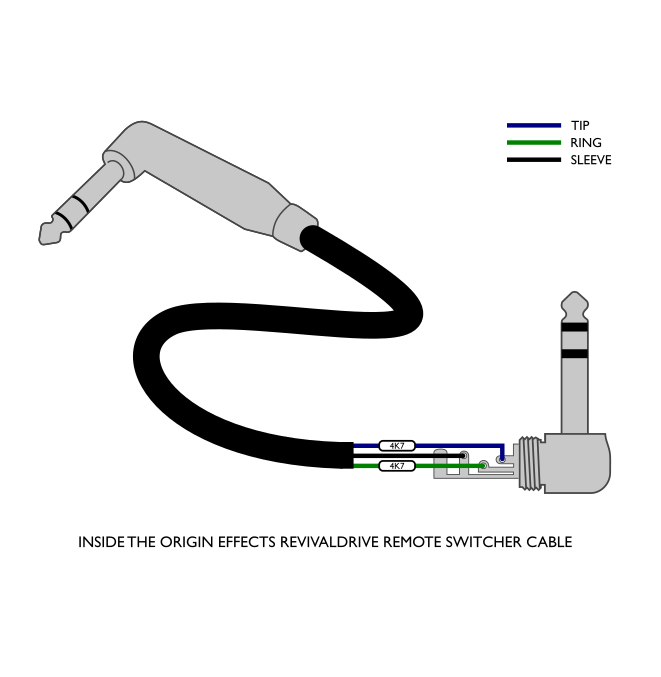
Not all players need to control all four parameters remotely, and many are happy to use the local footswitches on the pedal, so there is the option to build a special Remote Switcher Cable that gives you control over TWO parameters:
- Mid Boost
- Blend Override
The special cable is needed for compatibility with our level sensing format. It has two resistors built into it – details on how to build your own can be found here: https://origineffects.com/wp-content/uploads/2018/05/Custom-TRS-cable-drawing-angled.png?e5cc7f&e5cc7f

Another option that many users like is our dedicated Revival Footswitch, which lets you control Mid Boost and Blend Override. This is the normally the easiest way to add footswitches for these functions, but unfortunately doesn’t connect to remote switching systems.
https://origineffects.com/product/revival-footswitch/
The Revival Footswitch is built to work with our level sensing circuitry, and can be connected using any off-the-shelf TRS cable.
Is the RevivalDRIVE Compact based on a valve or silicon rectifier?
The rectifier stage in the RevivalDRIVE Compact is set to sound and feel somewhere between a silicon rectifier and a GZ34 valve rectifier.
Does the RevivalDRIVE Compact feature the 'ghosting' effect?
In order to condense the circuit design of the original RevivalDRIVE to fit everything in a compact-style enclosure, we have had to leave out certain features. The circuitry which reproduced the mains power supply took up a lot of real estate, so we made the decision to not include and ghosting features on the RevivalDRIVE Compact.
Gain or Volume?
With the original RevivalDRIVE we kept the aesthetics true to the non-master volume amps that the pedal was inspired by, labelling the gain adjustment knobs VOLUME. However, we have now renamed the volume control to ‘Gain’ to be more in keeping with modern amps and overdrive pedals.
More Gain = More Overdrive!
What are the Post-Drive EQ and RE-AMP EQ controls?
The POST-DRIVE EQ is very similar to the RE-AMP EQ on the original RevivalDRIVE. A three-way toggle switch tailors the output of the pedal to suit your amplifier, whether it is voiced bright, dark or flat.
The RevivalDRIVE Compact has a simple set of controls to quickly set the pedal to your amp. The RevivalDRIVE Standard offers further adjustment with a control to counteract the effects of an amp’s bright-cap, and the RevivalDRIVE CUSTOM offers an extensive range of controls which can be used to translate the vast range of amp tones in the pedal to even the most obscure amps.
How does the ADJ (Adjust) control work?
We have included the ADJ control from the RevivalDRIVE Custom EQ Panel. This is a continuously adjustable filter that allows you to tweak the output of the pedal to fit your clean amplifier with ease.
Can the RevivalDRIVE Compact be used as a boost?
The RevivalDRIVE Compact features a new interactive blend control. When you dial back the blend knob, the overdrive signal will clean up. The RevivalDRIVE Compact does have a high output gain and can be used as a boost to push your existing valve amplifier.
What’s the range of the output control on the RevivalDRIVE Compact?
This time we have tweaked the range of the output control so that when the output is set all the way down, no signal will pass from the output stage of the pedal.
What does the Highs control do?
The RevivalDRIVE Compact does not feature a switchable preamp shape as original RevivalDRIVE does. In its place we have included a Highs control that provides continuous adjustment through a range of classic Fender and Marshall-style preamp voicings, progressively increasing mid-range and highs.
How can I build my own Remote Switcher Cable?
If solely the mid engage and blend override functions are required to be switched remotely, then our Remote Switcher Cable be used without the need for the Switcher Interface. The 4k7 ohm resistors inside this cable allow the switch to be partially closed which is enough for just the mid engage and dry override to be toggled.
Connect the Remote Switcher Cable from a control switch jack on the controller to the RevivalDRIVE’s F/SWITCH connection.
PLEASE NOTE: remote switching of the bypass state and active channel can only be achieved with the Switcher Interface.
REVIVALTREM / DELUXE61:
What external footswitches can be used with the RevivalTREM?
You can use an external momentary switch to control the tremolo speed. Options include the Boss FS-5U or MXR M199 Tap Tempo switches.
You can also remotely toggle the tremolo function on and off via an external latching switch. This function requires using a TRS ¼” jack cable. The tremolo function is on when the ring is connected to the sleeve.
Can I get tremolo without the drive?
It is possible to achieve cleaner tones by keeping the DRIVE control at low settings and compensating for volume using the output control. Note that the tremolo effect becomes more interactive with higher DRIVE settings, making the tremolo effect less intense when picking harder.
What does the MULTI switch do?
The MULTI switch multiplies the speed of the tremolo effect by x1, x2 and x3.
The switch can provide 3 different ranges on the SPEED control or it can be used to change how the tapped tempo relates to the tremolo speed.
When a tap tempo footswitch is used, the tremolo speed can be set to be the same as, double or triple the tapped-in tempo.
What’s the difference between the wave shapes on the RevivalTREM?
The SHAPE switch offers the choice of a smooth sine wave and a pulsating full-wave shape. The sine wave is modelled on the classic brownface-style tremolo whereas the full-wave setting delivers a more intense tremolo effect.
BASSRIG:
What is an Analogue Amp Recreation?
Amp Recreation is the name that we give to our pedals which completely recreate the behaviour of classic valve amps, using all-analogue circuitry. We believe the best way to recreate an amp’s tone in a pedal is to recreate the amp’s signal path in miniature. Using transistor-based circuitry, we simulate the preamp, phase inverter, push-pull power amp and reactive load, giving you a pedal that not only sounds like the real thing, but feels like it too! In the BASSRIG pedals, we go a step further and add an all-analogue cabinet simulation too, giving you the complete vintage bass amp experience in a single, DI-ready box.
Which BASSRIG pedal should I buy?
It depends on what kind of bass tone you like. All three BASSRIG pedals are recreation of vintage valve bass amps, but with distinctly different personalities.
The BASSRIG Fifteen is based on the Ampeg B-15 Portaflex combo amp – a small, low-powered 1x15 combo that is considered the holy grail of studio bass amps. It has a warm and punchy sound that is often associated with ‘60s soul records, although it has been used on recordings across all genres. When cranked up, it can get into rockier territory but retains a softer, more rounded tone.
The BASSRIG Super Vintage is based on the Ampeg SVT and its 8x10 cab. This the go-to tone for rock bassists and anyone looking to fill a big stage with a huge bass tone. Expect deep clean tones, tweakable midrange frequencies and a signature grinding overdrive that is instantly recognisable.
The BASSRIG ’64 Black Panel gives you a real 1960s live bass tone. Based on the Fender Showman and Bassman and their matching 2x15 cab, this pedal has a percussive and woody tone, before breaking up into fat, gritty overdrive. Tones range from blues and R&B, through beat pop, all the way to gnarly indie and punk rock overdrive.
The ’64 Black Panel is based on “high-powered Fender® amps”, but which ones?
Back in the ‘60s, before modern bass amps as we know them, bassists would have used a number of different Fender® amps – favoured for their loud, clean tone. We picked two of the best: the Showman® and Bassman®. These were both popular among bassists and are tonally similar, with an important difference. The Showman’s circuit progressively removes low end as it begins to distort, keeping things tight and controlled. The Bassman® does the opposite – retains low end which becomes looser and more unruly as the gain increases. This is controlled by the BASSRIG ’64 Black Panel’s BRIGHT/FAT switch. The BLK/TWD switch changes from a ‘60s circuit to a ‘50s “Tweed” spec, altering the tone stack and negative feedback for more gain and mids.
Are the BASSRIG pedals overdrives or preamps?
They’re both! The BASSRIG pedals are full-featured preamps which offer the full spectrum of vintage valve bass amp tones, but they can be used as drive pedals with a traditional amp too. The AMP OUT EQ allows the BASSRIG pedals to be used as an overdrive pedal with any amp, either to compliment or contrast your core tone. Alternatively, use your BASSRIG as an “always on” preamp, either with an amp or direct to the PA from the cabinet simulated DI OUT.
How should I power my BASSRIG?
The BASSRIGs require a 9VDC centre negative 2.1mm power adaptor (minimum 150mA). Voltage is boosted internally for high headroom.
Will I damage my BASSRIG if I apply phantom power to the DI OUT?
No. The BASSRIG pedals will not be damaged if phantom power is accidentally applied to the DI OUT, though we do not recommend prolonged exposure to phantom power. The BASSRIG pedals cannot be powered by phantom power.
Can I use my BASSRIG as a standalone “always on” preamp?
Yes! The BASSRIG pedals recreate the whole circuit of the amps they’re based on, plus an analogue simulation of the matching cab. They can produce the entire range of sounds you’d expect from a vintage amp and can be run straight into a traditional amp, FX loop return, flat power amp or as the “amp sound” in a direct-to-PA rig.
Will my BASSRIG work with my other pedals?
Yes. Because the BASSRIG pedals recreate the behaviour of classic valve amps, they will take pedals just like a real amp. Their voltage is boosted internally for massive headroom, so expect great results with drive, fuzz, compressor, boost and anything else you want to throw at them.
Can I use my BASSRIG direct to my recording interface?
Yes. Connecting the DI OUT to the input of your interface will give you the tone of a vintage amp and a mic’d cab straight to your DAW, no extra processing needed. Use the AMP OUT if you want to add your own cabinet simulation (or set the cab sim to OFF if you have the BASSRIG Fifteen).
What is the AMP OUT EQ?
The AMP OUT EQ is a combination of steep filters and precise high-frequency and low-frequency trimmers, and has two main functions.
If you are using the AMP OUT and the DI OUT simultaneously, the AMP OUT EQ allows you to tweak your on-stage amp tone to match your DI sound. This is especially useful if you use backline amps (which can be very different from show to show), or you use a lightweight, modern amp and want to match the vintage-flavoured sound from the DI.
Alternatively, you might only use the AMP OUT into an amp, using your BASSRIG more like a traditional drive pedal. When you kick the BASSRIG on to go from a modern clean tone to a more vintage driven tone, the AMP OUT EQ lets you balance the BASSRIG’s tone with your amp’s clean sound, meaning you don’t have to compromise your amp’s settings to get the two sounds to work together. This could mean keeping your core tone consistent and just adding a little grit, or getting a big contrast between your modern clean tone and your vintage overdrive sound. The choice is yours!
Please consult the user manual for your BASSRIG pedal for full details of the AMP OUT EQ controls.
Why is the BASSRIG Fifteen’s AMP OUT EQ different?
The BASSRIG Fifteen is based on the Ampeg B-15 Portaflex, which has a very different sound to most modern bass amps, so the AMP OUT EQ has more work to do to get your on-stage amp to match the authentic B-15 tone from the DI OUT.
The B-15 has a very warm top-end response, so only single, darker HI CUT option is required compared to the two options on the other BASSRIGs. The BASSRIG Fifteen also gains a LO CUT switch. This steeply rolls off low frequencies so that your modern on-stage amp can match the tight low-end of the small 1x15 cab, simulated in the DI OUT – another important part of the B-15 sound. This switch is not required on the other BASSRIG pedals, as their DI OUTs simulate the sound of larger cabs which have much more low-frequency content.
Can I use the AMP OUT and DI OUT at the same time?
Yes. This allows you to run an amp on stage for monitoring, while sending a cabinet simulated output to the PA. When connecting both outputs, you may experience a hum caused by a ground loop. If a ground loop is present, set the DI GROUND switch to LIFT. When only using the DI OUT, this switch should be set to GND.
Can I bypass the DI cab sim?
The DI CAB SIM switch lets you select if the cab sim is always on, or only active when the pedal is engaged. Set to “FX+BYP” to access the BASSRIG’s cab sim, for use with other drives or preamps. When set to “FX”, the BASSRIG doubles up as a completely clean, studio-quality DI when bypassed. There is no cab sim applied to the AMP OUT.
HALCYON GREEN OVERDRIVE:
What is adaptive circuitry?
The ADAPT switch activates the adaptive circuitry in the Halcyon Green Overdrive, which reduces its mid-forward voicing as the pedal cleans up (either as a result of playing dynamics or rolling back the volume knob). This means that not only does the tone get cleaner, it becomes more “full-range” the cleaner it gets. Once the pedal is fully clean, your tone is almost identical to having the pedal bypassed. There’s a wide range of tones available, all the way from a full-bodied clean tone to a very mid-focused lead sound, all accessible with playing dynamics and volume knob changes.
What is a mid-forward voicing?
The Halcyon Green Overdrive is inspired by the Ibanez® TS808 Tube Screamer®. Like most traditional overdrive pedals, it exaggerates the midrange frequencies in your guitar signal. By removing some bass and treble, then amplifying what’s left, traditional drives push that important midrange content to the front of the mix, allowing your guitar to cut through for a solo, whilst preventing “flubby” low-end and high-pitched feedback from all that extra gain.
What is "cleaning up from the volume knob"?
In the days before overdrive pedals or channel-switching amps, the only way to get from clean to overdriven was to crank your amp until it distorted, then turn your guitar volume down when you needed to clean up. Doing this reduces the signal level going to the amp, allowing it to drop below the level at which it begins to distort. Turn the guitar back up and you’re back into overdrive! The principle is the same whether your overdrive is coming from an amp or pedals, and many players still love the infinite shades of drive that this approach offers. Typically, overdrive pedals are less able to do this well. The ADAPT switch on the Halcyon Green Overdrive ensures that this gradual transition from clean to drive happens much more naturally.
What is the DRY control and how do I use it?
In an original TS808 Tube Screamer®, there is some unaffected “dry” signal blended in with the drive signal. This helps to maintain clarity and definition when boosting an overdriven amp. The Halcyon Green Overdrive gives you control over the level of that dry signal. Turning the DRY control above noon increases this dry signal, which can emphasise pick attack and add some punch in the low end.
ADAPT settings I and II allow higher DRIVE settings on the Halcyon Green Overdrive to sound more natural than a typical overdrive pedal when used with a clean amp. Turning the DRY control fully counterclockwise gives you just the overdriven tone, without any clean peaks that can jump out of the mix.
Which voice setting should I use?
The VOICE switch on the Halcyon Green Overdrive selects between two different “mid humps”. The 808 setting is the stock voicing of the TS808 Tube Screamer®, warm in character and boosting across a relatively wide range of mid frequencies. This setting works particularly well for fattening up single coil pickups for a thick blues lead tone.
The MOD setting moves the mid hump slightly further up the frequency range, with a more focused peak. This setting is well suited to humbuckers, especially the neck position, adding some “bite” without too much extra warmth. The MOD setting is also useful from Metal players boosting high-gain amps, as it adds an aggressive edge to the tone.
Where should I place the Halcyon Green Overdrive in my pedalboard signal chain?
The Halcyon Green Overdrive can definitely be classed as a traditional drive pedal. As such, it can be placed in the “traditional” place in a pedalboard signal chain – after fuzz, wah and compression but before modulation, delay, reverb and “amp in a box” type pedals. Because of its adaptive circuitry, the Halcyon Green Overdrive makes a very capable “always on pedal”, meaning it works well nearer the start of the chain. Of course, there is no such thing as right or wrong when it comes to this stuff, so experiment and trust your ears!
Should I be using the Halcyon green Overdrive with a dirty or clean amp?
As a TS808-inspired pedal, the Halcyon Green Overdrive excels when running into an amp either on the edge of breakup or slightly overdriven. The mid-forward voicing, low gain drive tone and a touch of clean signal help push an amp into a thick, overdriven lead tone that cuts through the mix nicely. However, the more natural drive tones accessed via the ADAPT switch mean this pedal can also work very well as a standalone overdrive, when run into a completely clean amp.
M-EQ DRIVER:
What is a Pultec®?
Pultec® is a brand of studio EQ from the 1950s. They use a passive EQ circuit which is very different from most modern EQs. They are defined by their broad, musical EQ curves and also by their ability to provide subtle saturation and colouration from their push-pull valve output stages. The M-EQ Driver captures not only the mid-boosting capabilities of a Pultec® EQ but also the overdrive characteristics, with enough range to work in place of a traditional guitar overdrive pedal.
What is Cut / What is Adaptive Cut / How to use adaptive cut?
The CUT control recreates the high frequency attenuation band of a Pultec® EQ. Put simply, turning the CUT control clockwise removes top end from your signal. Engaging our Adaptive Circuitry reduces the effect of the CUT control as the pedal cleans up from playing dynamics or volume knob changes. This means that, as you clean up, the Adaptive Circuitry restores all the treble that the CUT control was removing. This means you can morph from a dark overdriven tone to a bright clean sound just by turning down your guitar’s volume control or playing softly.
Should I be using the M-EQ Driver with a clean or dirty amp?
The M-EQ Driver is equally capable of boosting and overdriven amp or providing an overdriven tone in its own right. Generally speaking, cleaner settings on the M-EQ Driver will work better with more overdriven amps and vice versa. But there are no rules so feel free to experiment!
What type of overdrive is the M-EQ Driver / How does it create overdrive?
The M-EQ Driver creates its overdrive by overdriving its push-pull output stage. Although it is based on a studio EQ, this sounds quite similar to power amp overdrive in a vintage valve amp. The difference is in how much midrange content a Pultec EQ can push into that output stage. Pushing more mids into the M-EQ Driver’s output stage creates more overdrive at the chosen frequency, resulting in thick and focused tones that have their own unique character.
Where should I place the M-EQ Driver in my signal chain?
While there is never a truly definitive answer to this question, the M-EQ Driver will work best as part of your overdrive and boost chain, placed before your amp or any “amp in a box” type drive pedals. It can boost an amp or amp-style pedal very well, so try experimenting with placement amongst, or in place of, your other traditional overdrive pedals.
Is it a mid boost or drive?
It’s both! When set clean, the M-EQ Driver can provide a prominent but musical boost in the midrange, helping to push your amp into overdrive and out of the mix. When overdriving the M-EQ Driver, you can either keep the MIDS low and enjoy an amp-like, natural drive tone, or push more mids into the push-pull output stage and create some really resonant, howling overdrive tones.
Will it work as a solo boost in the FX-Loop of my amp?
The M-EQ Driver is designed to be used like a traditional overdrive or boost placed in front of the amp, rather than a surgical EQ that you might use in the FX loop. Because of the M-EQ Driver’s ability to overdrive itself, it may be difficult to keep it completely clean when driving it from an amp’s preamp. It works better to add character or colouration nearer the start of your signal chain.
DCX BOOST & DCX BASS:
What is a UA 610?
The UA 610 is a classic studio preamp, which the DCX BOOST is based on. The 610 is famous for adding analogue warmth to a signal, as well as some basic but very usable EQ. When driven hard, this type of retro preamp can produce saturated overdriven tones with a character quite different to typical overdrive pedals. The DCX BOOST combines all these desirable attributes, optimises the EQ frequencies for electric guitar and adds our own Adaptive Circuitry for extra flexibility.
Is the DCX BOOST a boost, an overdrive or a preamp?
It’s all of them! Depending on how you set it, the DCX BOOST can function as a clean boost, pushing the front end of an amp or other pedals, or as an overdrive in its own right. It can even be used straight into a recording interface for those “direct to console” tones. In EQ mode, with the DRIVE control set low and the LEVEL control set high, the DCX BOOST works as a clean boost, with some tone-shaping available from the L.F. and H.F. knobs. Higher DRIVE settings in EQ mode will elicit mild overdrive, while OD mode offers more overdriven and highly saturated sounds.
What's the difference between the DCX BOOST and DCX BASS?
The DCX BOOST and DCX BASS are similar pedals, one optimised for guitar, one optimised for bass. The DCX BASS’s H.F. controls works at a significantly higher frequency than that of the DCX BOOST, boosting important parts of a bass guitar signal without getting in the way of guitar, vocals or other mid-focused instruments.
Should I use it with a clean or dirty amp?
The DCX BOOST works very well into either clean or dirty amps. Because the DCX BOOST has such a range of sounds available, it is equally at home subtly sculpting clean tones, boosting an overdriven amp, providing an overdrive tone for use with a clean amp or even adding a super-saturated sound for use with an already driven amp. It can even run straight into your recording interface or mixer. It’s a very versatile pedal.
Where should I place it in my chain?
The DCX BOOST works best near the beginning of the chain, before your other overdrives. It can be very effective at boosting the front end of other pedals or making tonal tweaks before other drive pedals. Because of the DCX BOOST’s ability to overdrive, it will not work as well as a clean solo boost near the end of the chain or in the FX Loop of an amp.
What is Adaptive Circuitry?
Adaptive Circuitry is our proprietary technology which allows our analogue circuits to adjust tonal parameters in real-time, in response to player input. Put simply, the DCX BOOST in EQ mode rolls of more treble the more you push it into overdrive. This means that you can dial in warm overdriven tones, then move seamlessly to a brighter clean tone by rolling back the guitar volume or playing softly.
What's so clever about the LF/HF controls?
The L.F. and H.F. control have been designed to have a completely flat response in the 12 o’clock position, as well as to allow cutting and boosting without any adverse effects on overdriven tones. Typically, overdrive pedals rely on some bass and treble roll-off to maintain clarity when distorted, giving them an inherent “voicing” that can’t be dialled out. In the DCX BOOST, you can crank the L.F. and H.F. controls with an overdriven sound, without the tone becoming mushy or indistinct in the low end or overemphasising upper harmonics. This results in studio-quality tone-shaping with both clean and overdriven tones.
As it's based on the UA 610, can I use it on other sources?
Yes! The DCX BOOST has plenty input headroom, so it can deal with signals from keyboards, mixer inserts, aux sends and other sources. At Origin Effects, we have a background in designing high-end pro audio gear and want our studio inspired pedals to work just like great studio gear. Feel free to try the DCX BOOST on vocals, drums, horns, cowbell…
I play guitar and bass. Should I buy the DCX BOOST or DCX BASS?
The two pedals are quite closely related, with the biggest difference being the H.F. control frequency, which is significantly higher on the DCX BASS. Because the response is completely flat with this control in the 12:00 position, the difference between the pedals will be more obvious the more you cut or boost the H.F. With more subtle settings, either pedal should work very well for both instruments. The short answer: whichever is your primary instrument, that’s the pedal you should buy.
Will it work as a solo boost in the FX Loop of my amp?
This is not the intended use for the DCX BOOST. Because the DCX BOOST recreates the overdrive capabilities of the UA610, it may struggle to stay clean with the higher signal levels expected in an amp’s FX loop. In this case, a very clean pedal is usually desirable and the DCX BOOST may begin to drive a little too easily. It won’t break, but expect a little colouration.
HALCYON GOLD OVERDRIVE:
What is adaptive circuitry?
The ADAPT switch activates the adaptive circuitry in the Halcyon Gold Overdrive, which reduces its mid-forward voicing as the pedal cleans up (either as a result of playing dynamics or rolling back the volume knob). This means that not only does the tone get cleaner, it becomes more “full-range” the cleaner it gets. Once the pedal is fully clean, your tone is almost identical to having the pedal bypassed. There’s a wide range of tones available, all the way from a full-bodied clean tone to a very mid-focused lead sound, all accessible with playing dynamics and volume knob changes.
What is a mid-forward voicing?
The Halcyon Gold Overdrive is inspired by the Klon® Centaur®. Like most traditional overdrive pedals, it exaggerates the midrange frequencies in your guitar signal. By removing some bass and treble, then amplifying what’s left, traditional drives push that important midrange content to the front of the mix, allowing your guitar to cut through for a solo, whilst preventing “flubby” low-end and high-pitched feedback from all that extra gain. The Centaur® takes this a step further by making the mid-hump more prominent the higher you set the gain control. This means that more overdriven sounds have an exaggerated midrange, while clean tones have a more neutral frequency response. The Halcyon Gold Overdrive’s Adaptive Circuitry means you can move between these two sounds by adjusting the guitar volume, rather than needing to change the settings on the pedal.
What is "cleaning up from the volume knob"?
In the days before overdrive pedals or channel-switching amps, the only way to get from clean to overdriven was to crank your amp until it distorted, then turn your guitar volume down when you needed to clean up. Doing this reduces the signal level going to the amp, allowing it to drop below the level at which it begins to distort. Turn the guitar back up and you’re back into overdrive! The principle is the same whether your overdrive is coming from an amp or pedals, and many players still love the infinite shades of drive that this approach offers. Typically, overdrive pedals are less able to do this well. The ADAPT switch on the Halcyon Gold Overdrive ensures that this gradual transition from clean to drive happens much more naturally.
What is the DRY control and how do I use it?
In an original Klon® Centaur®, there is some dry guitar signal mixed in with the overdriven sound. The level of this dry signal is dictated by the settings of the pedal’s controls. Lower-gain tones have more dry signal and higher-gain tones have less – there is not a dedicated dry level control.
On the Halcyon Gold Overdrive, we have made this dry signal level independently adjustable. Higher DRY levels can help add definition, body and pick attack to more overdriven tones, especially when boosting an overdriven amp.
Turning the DRY control all the way down can be useful when using a completely clean amp and getting all your overdrive from the pedal.
Which voice setting should I use?
The VOICE switch on the Halcyon Gold Overdrive changes the shape of the mid hump and slightly alters the clipping characteristics. In the KLN setting, we have accurately recreated the clipping characteristics of the unobtainable vintage diodes in the Klon® Centaur®, as well as its aggressive mid-forward voicing. This setting is particularly well suited to boosting an overdriven amp and adding presence to humbuckers.
The MOD setting enables a broader, less resonant mid hump, as well as a softer clipping characteristic. This setting is slightly smoother more restrained, working well with single coil pickups and cleaner amp tones.
Where should I place the Halcyon Gold Overdrive in my pedalboard signal chain?
The Halcyon Gold Overdrive can definitely be classed as a traditional drive pedal. As such, it can be placed in the “traditional” place in a pedalboard signal chain – after fuzz, wah and compression but before modulation, delay, reverb and “amp in a box” type pedals. Because of its adaptive circuitry, the Halcyon Gold Overdrive makes a very capable “always on pedal”, meaning it works well nearer the start of the chain. Of course, there is no such thing as right or wrong when it comes to this stuff, so experiment and trust your ears!
Should I be using the Halcyon Gold Overdrive with a dirty or clean amp?
As a Centaur®-inspired pedal, the Halcyon Gold Overdrive excels when running into an amp either on the edge of breakup or slightly overdriven. The mid-forward voicing and the blended clean signal help push an amp into a thick, overdriven lead tone that cuts through the mix nicely. However, the more natural drive tones accessed via the ADAPT and VOICE switches mean this pedal can also work very well as a standalone overdrive, when run into a completely clean amp.
HALCYON BLUE OVERDRIVE:
What is adaptive circuitry?
The ADAPT switch activates the adaptive circuitry in the Halcyon Blue Overdrive, which reduces its midrange emphasis as the pedal cleans up (either as a result of playing dynamics or rolling back the volume knob). This means that not only does the tone get cleaner, it becomes more “full-range” the cleaner it gets. Once the pedal is fully clean, your tone is almost identical to having the pedal bypassed. There’s a wide range of tones available, all the way from a full-bodied clean tone to a mid-boosted lead sound, all accessible with playing dynamics and volume knob changes.
What is midrange emphasis?
The Halcyon Blue Overdrive is inspired by the Marshall® Bluesbreaker®. Like most traditional overdrive pedals, it exaggerates the midrange frequencies in your guitar signal. By removing some bass and treble, then amplifying what’s left, traditional drives push that important midrange content to the front of the mix, allowing your guitar to cut through for a solo, whilst preventing “flubby” low-end and high-pitched feedback from all that extra gain. The Bluesbreaker® has a much broader, less focused “mid hump” than some other popular overdrives, making it sound natural while still standing out in a mix. However, when cleaning up from the guitar volume control, the clean tone can sound a little thin compared to bypassing the pedal. The Adaptive Circuitry restores the missing bass and treble as the pedal cleans up, but retains the pedal’s mid emphasis when overdriven.
What is "cleaning up from the volume knob"?
In the days before overdrive pedals or channel-switching amps, the only way to get from clean to overdriven was to crank your amp until it distorted, then turn your guitar volume down when you needed to clean up. Doing this reduces the signal level going to the amp, allowing it to drop below the level at which it begins to distort. Turn the guitar back up and you’re back into overdrive! The principle is the same whether your overdrive is coming from an amp or pedals, and many players still love the infinite shades of drive that this approach offers. Typically, overdrive pedals are less able to do this well. The ADAPT switch on the Halcyon Blue Overdrive ensures that this gradual transition from clean to drive happens much more naturally.
What is the DRY control and how do I use it?
The Bluesbreaker® has some dry, unaffected signal mixed in with the overdrive tone. This control adjusts the level of that dry signal. In the noon position, the dry level is the same as in an original Bluesbreaker® pedal. When turned clockwise, this control helps maintain body, clarity and definition when used with a more overdriven amp, and has the effect of softening the clipping characteristics of the pedal. Turning counterclockwise removes the dry signal. This can help when using the pedal as a standalone overdrive into a clean amp, giving a harder-edged, purely overdriven tone. The effect of this control will be more noticeable with higher DRIVE settings.
Which voice setting should I use?
This switch selects between either the classic Bluesbreaker® tone in the BB mode, or our own modded voicing. The MOD setting combines different diode clipping characteristics with higher gain and a deeper, warmer frequency response.
For warm lead tones, and for adding some weight to thinner, single coil pickups, try the warmer mids and higher gain of the MOD mode. If your guitar has plenty of low mids already, or you want the brighter, tighter, authentic Bluesbreaker® tone, try the BB mode.
Where should I place the Halcyon Blue Overdrive in my pedalboard signal chain?
The Halcyon Blue Overdrive can definitely be classed as a traditional drive pedal. As such, it can be placed in the “traditional” place in a pedalboard signal chain – after fuzz, wah and compression but before modulation, delay, reverb and “amp in a box” type pedals. Because of its adaptive circuitry, the Halcyon Blue Overdrive makes a very capable “always on pedal”, meaning it works well nearer the start of the chain. Of course, there is no such thing as right or wrong when it comes to this stuff, so experiment and trust your ears!
Should I be using the Halcyon Blue Overdrive with a dirty or clean amp?
As a Bluesbreaker®-inspired pedal, the Halcyon Blue Overdrive excels when running into an amp either on the edge of breakup or slightly overdriven. The midrange emphasis and the blended clean signal help push an amp into a thick, overdriven lead tone that cuts through the mix nicely. However, the more natural drive tones accessed via the ADAPT and VOICE switches mean this pedal can also work very well as a standalone overdrive, when run into a completely clean amp.